




In this article, you will learn how to set up the LAMP stack on a Linux distribution. The guide covers various distributions like Ubuntu, Fedora, Debian, CentOS, etc.
LAMP is agronomy for:
- Linux – Operating system
- Apache2 – Web-server
- MySQL or MariaDB – Database server
- PHP – The back-end scripting language.
A LAMP setup is for running a back-end based web application on an actual server or on your localhost computer where the developer is developing it. In any of the cases, you are required to have it.
Let’s get into the installation guide on how to install and configure a LAMP stack on a Linux machine.
Installing LAMP stack On Linux
The LAMP can be installed on different kinds of distributions. Let’s see the installation guides for them.
Installing Apache2 web-server
For distributions like Ubuntu, Debian or any of their derivatives:
sudo apt-get install apache2For Fedora, CentOS or Red hat:
sudo dnf install httpdInstalling MySQL or MariaDB database server
To install MySQL on Ubuntu, Debian or any of their derivatives, execute the follow command in the terminal:
sudo apt-get install mysql-serverAs some distributions do not have MySQL in their repository or there is some license-related concern, then install MariaDB, it is MySQL with a different name.
sudo apt-get install mariadb-serverFor Fedora, CentOS or Red Hat:
sudo dnf install community-mysql-serverFor MariaDB:
sudo dnf install mariadb-serverAfter install any of these two database servers, use this command to securely configure the database settings.
sudo mysql_secure_installationFor more detail please check out this video guide: Installing Mysql on Linux
Installing the PHP and some required modules
For distributions like Ubuntu, Debian or any of their derivatives:
sudo apt install php libapache2-mod-php php-opcache php-cli php-gd php-curl php-mysqlOn Fedora, CentOS or Red Hat:
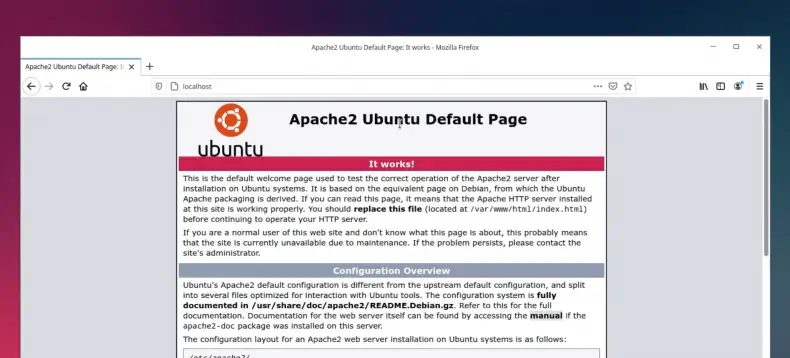
sudo dnf install php libapache2-mod-php php-opcache php-cli php-gd php-curl php-mysqlAfter installing all the required software, you can open up a browser and go to http://localhost or 127.0.0.1 and you should see this page.\
For more information on installation: Installing applications in Linux | Complete guide
Watch the video guide on YouTube
Additionally, you can also watch a step-by-step video guide on YouTube to get a better understanding of it.
Conclusion
So that’s it on how to install and set up the LAMP stack on Linux. Let me know what you think about it in the comments and subscribe to the LinuxH2O Youtube channel. Till then, keep enjoying Linux.


' font-size='7.328' font-family='dinb, Roboto, sans-serif' letter-spacing='0' word-spacing='0' fill='%23585858'%3E%3Ctspan x='19.173' y='11.062' font-weight='bold' font-family='dinb, Roboto, sans-serif' %3E235+ video guides%3C/tspan%3E%3C/text%3E%3C/svg%3E)


